Ubuntu 26.10 adds Windows-style snap layouts
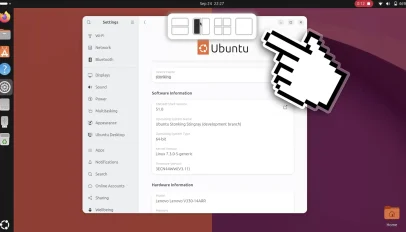
For years, the GNOME desktop environment has championed the philosophy of "less is more," relying on users to manually drag windows around until they naturally settle into an orderly arrangement. While effective for simple tasks, this approach often devolves into a chaotic game of whack-a-mole when juggling multiple applications. Ubuntu 26.10 marks a significant departure from this tradition by introducing a Windows-style snap layout system, effectively bridging the gap between the open-source ethos and the modern expectations of productivity found in commercial ecosystems. This feature addresses a long-standing pain point for power users who have grown weary of the trial-and-error method of window management.
The implementation is surprisingly intuitive, mimicking the behavior of the Tiling Shell extension that has long been popular among Linux enthusiasts. When you grab a window and drag it toward the top edge of the display, a semi-transparent overlay slides down, presenting a menu of preset layouts. These are not just abstract icons; they act as active drop zones. As you hover your window over a specific zone, the system instantly renders a ghost preview showing exactly how the window and any other open applications will be arranged. This real-time feedback loop eliminates the guesswork, allowing users to snap their windows into perfect harmony with a single release.
This shift represents more than just a cosmetic update; it is a fundamental evolution in how the desktop handles spatial awareness. For users who have migrated from Windows 11 or macOS, the learning curve is negligible because the mental model is already familiar. However, for the native Linux community, it validates the idea that traditional compositors can embrace structured tiling without sacrificing the flexibility of free-form windowing. It suggests that the industry is finally moving away from the notion that "tiling" requires a complex, rule-based configuration file to function correctly. Instead, it brings the power of algorithmic arrangement into the realm of interactive, user-driven decisions.
Critics might argue that this adds unnecessary overhead to a system designed for efficiency, or that it contradicts the minimalistic principles of the GNOME team. Yet, the practical benefits outweigh these theoretical concerns. In a workflow where a developer needs to compare code side-by-side, or a designer needs to reference documentation while working on a canvas, the ability to instantly reconfigure the workspace is invaluable. The snap layouts feature essentially provides the best of both worlds: the dynamic freedom of a standard window manager and the organized precision of a tiling window manager, all controlled by the user's mouse movements rather than a rigid set of rules.
As we look toward the future of desktop computing, features like this indicate a maturation of the open-source ecosystem. The integration of such robust usability features into mainstream Ubuntu releases signals that the community is no longer satisfied with merely having a working alternative to proprietary systems. They are now demanding an experience that matches, and in some ways surpasses, the polish of commercial products. Ubuntu 26.10 proves that the future of the desktop isn't about choosing between freedom and functionality; it is about combining them seamlessly, ensuring that tools adapt to the user's needs rather than forcing the user to adapt to the tools.
On Bluesky? Meet HomeSky.
Follower analytics, a growth toolkit, scheduling and AI posting — built for Bluesky. Connect your account and use everything free for 60 days.
Try HomeSky free →