Want to try Ubuntu’s AI dictation feature? Here’s how
For years, the promise of seamless voice-to-text on Linux has been a ghost story, a feature that lingers in the realm of enterprise software like Microsoft Word but feels perpetually out of reach for the desktop user. We have stared at command lines and third-party web services, waiting for a moment when our voices could be transcribed with the natural fluidity of a native app. That moment is finally knocking at the door of Ubuntu 26.10, not with a grand, polished launch party, but through a quiet, strategic deployment of components that suggest Canonical is ready to make the leap from experimental to standard.
At the heart of this shift is Myna, an AI-powered orchestrator that Canonical has recently dropped into the Snap Store. This isn't just another speech recognition library; it is a local-first architecture designed to keep your voice data off the cloud and entirely within the confines of your machine. By bundling the orchestrator along with specific speech-recognition models, Canonical is signaling a pivot toward privacy-preserving AI, a trend that has become increasingly vital as users grow wary of their digital footprints. The availability of these pieces in the Snap Store means they are instantly upgradable and sandboxed, solving the age-old nightmare of managing dependencies on a rolling-release desktop.
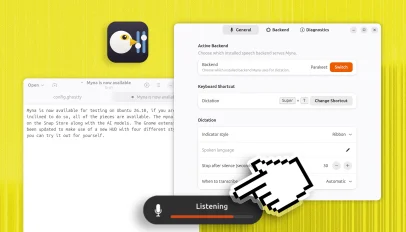
But the most tangible proof of this coming tide is the desktop integration available via the PPA for the Myna Settings tool. This utility provides the control panel necessary to fine-tune how the AI listens, processes, and transcribes your words. It transforms Myna from a raw engine into a functional instrument. For developers and power users, this is the difference between having a powerful GPU and having a driver that actually lets you play games. It allows for the configuration of specific models, setting sensitivity, and managing the lifecycle of the local AI processes, effectively turning the operating system itself into a dictation powerhouse.
The integration goes even deeper, reaching into the very fabric of the user interface through the gnome-shell-ubuntu-extensions package. This extension acts as the bridge between the raw AI processing and the human interface, triggering a Heads-Up Display when the system is actively listening or transcribing. It is a subtle but critical detail that acknowledges the uncanny valley of AI interaction; you need to know when the machine is paying attention to you without being intrusive. This HUD serves as a visual handshake, confirming that the local AI is active and ready to capture every nuance of your command.
Why does this matter beyond the novelty of speaking to your computer? Because it represents a fundamental shift in how Linux handles its own evolution. Instead of waiting for a monolithic release cycle to introduce bleeding-edge features, Canonical is now adopting a modular approach, releasing the pieces of a complex puzzle one by one. This strategy lowers the barrier to entry for testing, allowing enthusiasts to assemble their own early versions of the system and provide feedback that shapes the final product. It is a democratic approach to software development, where the community gets to be the first to experience the future.
As we await the formal call for testing and the eventual integration into the stable Ubuntu 26.10 release, the current setup offers a fascinating glimpse into the future of the desktop. It is a future where your voice is your primary interface, where privacy is baked into the architecture rather than bolted on as an afterthought, and where the line between the user and the machine blurs into a seamless conversation. The pieces are all there, waiting to be snapped together, promising a new era of interaction that feels less like computing and more like thinking aloud.
On Bluesky? Meet HomeSky.
Follower analytics, a growth toolkit, scheduling and AI posting — built for Bluesky. Connect your account and use everything free for 60 days.
Try HomeSky free →