Sublime Text gains new C# highlighter, file icon themes
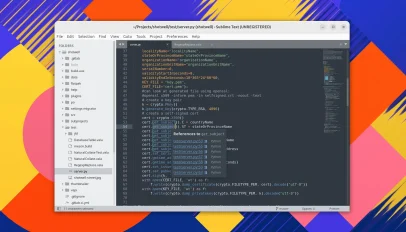
For years, the Sublime Text community has lived in a state of suspended animation, waiting for an update that feels less like a patch and more like a generational leap. The arrival of version 4213 shatters that stalemate, marking the first major evolution of the editor since May 2025. What was once a relic of the early cloud era has suddenly sprinted forward, ditching its conservative pace for a bold overhaul that finally addresses the core frustrations of modern development. This isn't just a minor refresh; it is a fundamental recalibration of the tool's identity in an ecosystem that has moved on without it.
The most jarring shift for any seasoned user is the default Python 3.14 interpreter. Gone are the days when Sublime Text clung to Python 3.8 as a comfortable anchor in the shifting sands of versioning. While the editor still quietly ships the ancient 3.3 runtime—a digital ghost kept alive only to prevent plugin breakage—the default setting now points toward the bleeding edge. This is a pragmatic, albeit risky, move by the developers to future-proof the IDE. It acknowledges that the cost of backward compatibility has become too high, forcing users to explicitly opt-in to legacy behavior rather than dragging the entire platform down with outdated defaults.
Beyond the interpreter wars, the update tackles the perennial pain point of C# development with a rewritten syntax highlighter. For the C# community, this is a watershed moment. The previous implementation, while functional, often felt sluggish and visually disconnected from the code's structure. The new engine brings a level of precision and responsiveness that rivals dedicated IDEs, transforming how the language is visually consumed within the editor. It is a stark reminder that even in the world of lightweight, cross-platform text editors, the devil is in the details of syntax parsing and rendering.
Perhaps the most exciting addition, however, is the long-awaited support for file icon themes. Until now, Sublime Text has remained stubbornly monochromatic, relying on generic icons that fail to provide the visual context found in integrated development environments or file explorers. This update allows developers to finally customize their file hierarchy with themes that match their aesthetic preferences or specific project needs. It bridges the gap between the raw power of a text editor and the visual richness of a full-featured IDE, offering a layer of intuition that can speed up navigation and reduce cognitive load.
The implications of these changes extend beyond mere feature lists. By abandoning the heavy baggage of outdated defaults and embracing a more modular approach to syntax and UI, Sublime Text is signaling a shift in its long-term strategy. The decision to keep Python 3.3 around only temporarily suggests a clear roadmap: the old will be preserved for a short window of stability, then discarded entirely. This is the editor finally growing up, prioritizing relevance over nostalgia and ensuring that the tool remains a viable option for the next decade of software engineering.
On Bluesky? Meet HomeSky.
Follower analytics, a growth toolkit, scheduling and AI posting — built for Bluesky. Connect your account and use everything free for 60 days.
Try HomeSky free →